Verifying your account helps for a few reasons :
Once you’ve officially been verified by the system, your account will display a blue check mark to show you’ve verified your account.
(Note: You can not use bank cards issued by Chinese banks located in your country to verify your alipay account.)
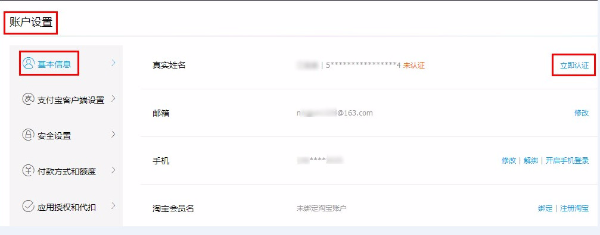
1. Login to your www.alipay.com account, click “Manage Account” – “Account Setting” – “Basic Information” – “Verify Now”.
2. Click “Verify Now(????)”.
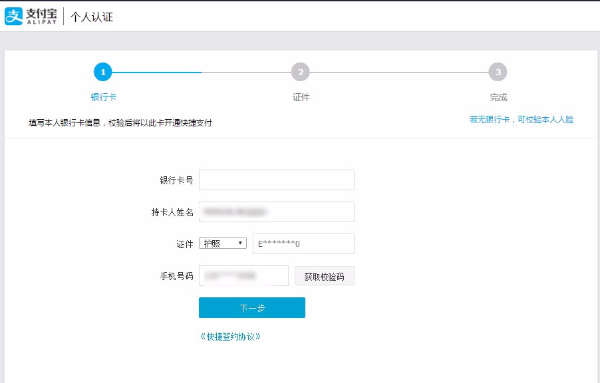
3. Fill in your personal information as required .
?? means passport
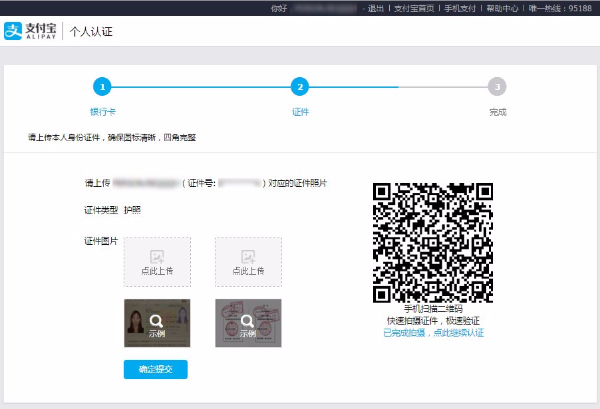
4. Upload your passport scan
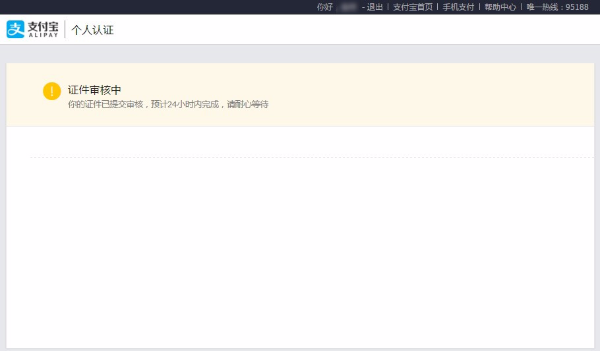
5. Submitted successfully, Verification will be completed in 24 hours.
6. Once the verification is approved, you will then have a verified real-name account.
Not every people can do this actually, because it will need China mainland bank account to verify your Alipay account. So what is the solution? You need someone to handle your payment to China marketplaces like Taobao, 1688, TMall, etc.
© 2018 Yuanpay Indonesia. All Rights Reserved.